
164 lines
16 KiB
XML
164 lines
16 KiB
XML
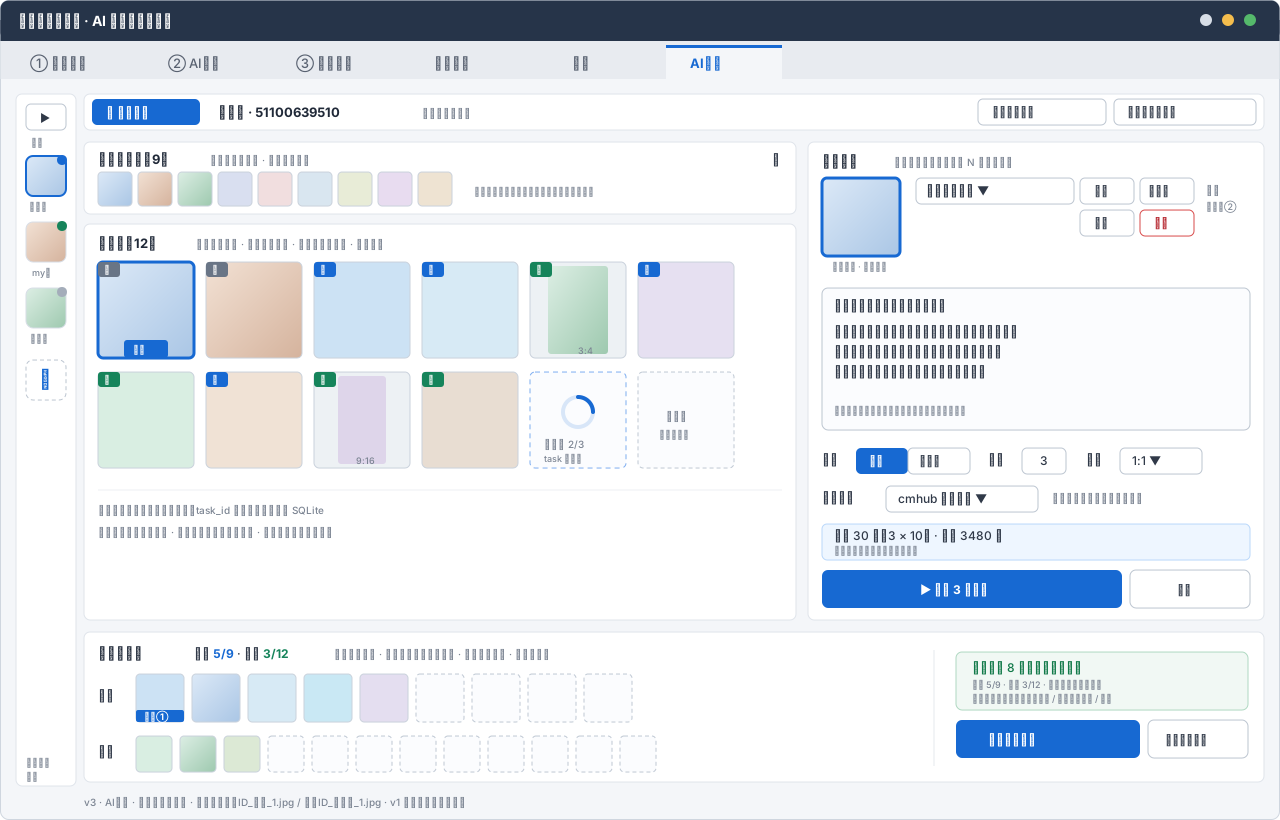


<svg xmlns="http://www.w3.org/2000/svg" width="1280" height="820" viewBox="0 0 1280 820" font-family="'Segoe UI','Microsoft YaHei',sans-serif">
|
||
<defs>
|
||
<style>
|
||
.window{fill:#f4f6f9;stroke:#cfd6df}.chrome{fill:#263449}.title{fill:#fff;font-size:14px;font-weight:600}
|
||
.tabs{fill:#e8ebf0}.tab{fill:#596271;font-size:13px}.tab-active{fill:#1769d2;font-size:13px;font-weight:600}
|
||
.panel{fill:#fff;stroke:#dfe4ea}.section{fill:#202938;font-size:13px;font-weight:600}.label{fill:#303948;font-size:12px}
|
||
.muted{fill:#7b8492;font-size:10px}.tiny{fill:#7b8492;font-size:9px}.input{fill:#fff;stroke:#bcc5d0}.textarea{fill:#fbfcfe;stroke:#bcc5d0}
|
||
.button{fill:#fff;stroke:#bcc5d0}.button-text{fill:#303948;font-size:11px}.primary{fill:#1769d2}.primary-text{fill:#fff;font-size:12px;font-weight:600}
|
||
.danger{fill:#fff;stroke:#d84a4a}.danger-text{fill:#b4232c;font-size:11px}.segment{fill:#fff;stroke:#bcc5d0}.segment-active{fill:#1769d2}
|
||
.segment-text{fill:#303948;font-size:11px}.segment-text-active{fill:#fff;font-size:11px;font-weight:600}
|
||
.thumb{stroke:#c9d1db}.thumb-selected{stroke:#1769d2;stroke-width:3}.empty{fill:#fbfcfe;stroke:#bfc8d3;stroke-dasharray:4 3}
|
||
.main-badge{fill:#1769d2}.detail-badge{fill:#16845b}.origin-badge{fill:#697586}.badge-text{fill:#fff;font-size:9px;font-weight:600}
|
||
.success{fill:#137a4a}.warning{fill:#9b6814}.info-box{fill:#eef6ff;stroke:#b9d7fa}.export-box{fill:#f1f8f4;stroke:#afd8c1}
|
||
</style>
|
||
<linearGradient id="photoA" x1="0" y1="0" x2="1" y2="1"><stop stop-color="#dce9f7"/><stop offset="1" stop-color="#aac6e5"/></linearGradient>
|
||
<linearGradient id="photoB" x1="0" y1="0" x2="1" y2="1"><stop stop-color="#f2e1d4"/><stop offset="1" stop-color="#d5b39d"/></linearGradient>
|
||
<linearGradient id="photoC" x1="0" y1="0" x2="1" y2="1"><stop stop-color="#dceee4"/><stop offset="1" stop-color="#9ec9af"/></linearGradient>
|
||
</defs>
|
||
|
||
<rect class="window" x="0.5" y="0.5" width="1279" height="819" rx="8"/>
|
||
<rect class="chrome" x="0.5" y="0.5" width="1279" height="40" rx="8"/><rect class="chrome" x="0.5" y="20" width="1279" height="21"/>
|
||
<text class="title" x="18" y="26">蝦皮圈優化助手 · AI 商品图片工作台</text>
|
||
<circle cx="1206" cy="20" r="6" fill="#d7dde6"/><circle cx="1228" cy="20" r="6" fill="#f4bd4d"/><circle cx="1250" cy="20" r="6" fill="#55b96b"/>
|
||
|
||
<rect class="tabs" x="0.5" y="41" width="1279" height="38"/>
|
||
<rect x="666" y="45" width="116" height="34" fill="#f4f6f9"/><rect x="666" y="45" width="116" height="3" fill="#1769d2"/>
|
||
<text class="tab" x="30" y="68">① 导入采集</text><text class="tab" x="168" y="68">② AI生成</text>
|
||
<text class="tab" x="296" y="68">③ 更新蝦皮</text><text class="tab" x="434" y="68">账号管理</text>
|
||
<text class="tab" x="572" y="68">设置</text><text class="tab-active" x="690" y="68">AI工场</text>
|
||
|
||
<!-- 商品轨 -->
|
||
<g transform="translate(16,94)">
|
||
<rect class="panel" width="60" height="692" rx="6"/>
|
||
<rect class="button" x="10" y="10" width="40" height="26" rx="5"/><text class="button-text" x="24" y="28">▶</text>
|
||
<text class="tiny" x="15" y="52">商品</text>
|
||
<rect x="10" y="62" width="40" height="40" rx="7" fill="url(#photoA)" stroke="#1769d2" stroke-width="2"/><circle cx="46" cy="66" r="5" fill="#1769d2"/>
|
||
<text class="tiny" x="13" y="116">女装店</text>
|
||
<rect x="10" y="128" width="40" height="40" rx="7" fill="url(#photoB)" stroke="#d7dde6"/><circle cx="46" cy="132" r="5" fill="#16845b"/>
|
||
<text class="tiny" x="16" y="182">my店</text>
|
||
<rect x="10" y="194" width="40" height="40" rx="7" fill="url(#photoC)" stroke="#d7dde6"/><circle cx="46" cy="198" r="5" fill="#a4adba"/>
|
||
<text class="tiny" x="14" y="248">饰品店</text>
|
||
<rect class="button" x="10" y="266" width="40" height="40" rx="7" stroke-dasharray="4 3"/><text x="23" y="292" fill="#1769d2" font-size="19">+</text>
|
||
<text class="tiny" x="10" y="672">点击切换</text><text class="tiny" x="10" y="686">项目</text>
|
||
</g>
|
||
|
||
<!-- 顶部操作 -->
|
||
<g transform="translate(84,94)">
|
||
<rect class="panel" width="1180" height="36" rx="6"/>
|
||
<rect class="primary" x="8" y="5" width="108" height="26" rx="5"/><text class="primary-text" x="22" y="23">+ 新增商品</text>
|
||
<text class="section" x="134" y="23">女装店 · 51100639510</text><text class="muted" x="338" y="23">项目已自动保存</text>
|
||
<rect class="button" x="894" y="5" width="128" height="26" rx="5"/><text class="button-text" x="908" y="22">拉取蝦皮主图</text>
|
||
<rect class="button" x="1030" y="5" width="142" height="26" rx="5"/><text class="button-text" x="1043" y="22">打开项目文件夹</text>
|
||
</g>
|
||
|
||
<!-- 原图抽屉 -->
|
||
<g transform="translate(84,142)">
|
||
<rect class="panel" width="712" height="72" rx="6"/>
|
||
<text class="section" x="14" y="22">蝦皮原主图(9)</text><text class="muted" x="126" y="22">单击加入照片池 · 双击查看大图</text><text class="label" x="688" y="22">▾</text>
|
||
<g transform="translate(14,30)">
|
||
<rect class="thumb" width="34" height="34" rx="4" fill="url(#photoA)"/><rect class="thumb" x="40" width="34" height="34" rx="4" fill="url(#photoB)"/>
|
||
<rect class="thumb" x="80" width="34" height="34" rx="4" fill="url(#photoC)"/><rect class="thumb" x="120" width="34" height="34" rx="4" fill="#d9dff0"/>
|
||
<rect class="thumb" x="160" width="34" height="34" rx="4" fill="#f1dedf"/><rect class="thumb" x="200" width="34" height="34" rx="4" fill="#d9e6f0"/>
|
||
<rect class="thumb" x="240" width="34" height="34" rx="4" fill="#e8ecd7"/><rect class="thumb" x="280" width="34" height="34" rx="4" fill="#e8dcf0"/>
|
||
<rect class="thumb" x="320" width="34" height="34" rx="4" fill="#eee3d2"/>
|
||
</g>
|
||
<text class="tiny" x="390" y="53">缩略图异步加载到内存,加入池时才保存原图</text>
|
||
</g>
|
||
|
||
<!-- 照片池 -->
|
||
<g transform="translate(84,224)">
|
||
<rect class="panel" width="712" height="396" rx="6"/>
|
||
<text class="section" x="14" y="24">照片池(12)</text><text class="muted" x="112" y="24">单击设为源图 · 双击查看大图 · 拖到下方终选槽 · 右键移除</text>
|
||
<g transform="translate(14,38)">
|
||
<rect class="thumb-selected" width="96" height="96" rx="5" fill="url(#photoA)"/><rect class="origin-badge" width="22" height="15" rx="3"/><text class="badge-text" x="6" y="11">原</text>
|
||
<rect class="primary" x="26" y="78" width="44" height="18" rx="3"/><text class="badge-text" x="35" y="91">源图</text>
|
||
<rect class="thumb" x="108" width="96" height="96" rx="5" fill="url(#photoB)"/><rect class="origin-badge" x="108" width="22" height="15" rx="3"/><text class="badge-text" x="114" y="11">原</text>
|
||
<rect class="thumb" x="216" width="96" height="96" rx="5" fill="#cce2f4"/><rect class="main-badge" x="216" width="22" height="15" rx="3"/><text class="badge-text" x="222" y="11">主</text>
|
||
<rect class="thumb" x="324" width="96" height="96" rx="5" fill="#d7eaf5"/><rect class="main-badge" x="324" width="22" height="15" rx="3"/><text class="badge-text" x="330" y="11">主</text>
|
||
<rect class="thumb" x="432" width="96" height="96" rx="5" fill="#edf1f4"/><rect x="450" y="4" width="60" height="88" rx="3" fill="url(#photoC)"/>
|
||
<rect class="detail-badge" x="432" width="22" height="15" rx="3"/><text class="badge-text" x="438" y="11">详</text><text class="tiny" x="480" y="92">3:4</text>
|
||
<rect class="thumb" x="540" width="96" height="96" rx="5" fill="#e6e0f1"/><rect class="main-badge" x="540" width="22" height="15" rx="3"/><text class="badge-text" x="546" y="11">主</text>
|
||
</g>
|
||
<g transform="translate(14,148)">
|
||
<rect class="thumb" width="96" height="96" rx="5" fill="#d9eee2"/><rect class="detail-badge" width="22" height="15" rx="3"/><text class="badge-text" x="6" y="11">详</text>
|
||
<rect class="thumb" x="108" width="96" height="96" rx="5" fill="#f0e2d5"/><rect class="main-badge" x="108" width="22" height="15" rx="3"/><text class="badge-text" x="114" y="11">主</text>
|
||
<rect class="thumb" x="216" width="96" height="96" rx="5" fill="#edf1f4"/><rect x="240" y="4" width="48" height="88" rx="3" fill="#ded5ea"/>
|
||
<rect class="detail-badge" x="216" width="22" height="15" rx="3"/><text class="badge-text" x="222" y="11">详</text><text class="tiny" x="258" y="92">9:16</text>
|
||
<rect class="thumb" x="324" width="96" height="96" rx="5" fill="#e8ddd2"/><rect class="detail-badge" x="324" width="22" height="15" rx="3"/><text class="badge-text" x="330" y="11">详</text>
|
||
<rect x="432" width="96" height="96" rx="5" fill="#fbfcfe" stroke="#7eadf0" stroke-dasharray="5 4"/>
|
||
<circle cx="480" cy="40" r="15" fill="none" stroke="#d8e6f8" stroke-width="4"/><path d="M480 25 A15 15 0 0 1 495 40" fill="none" stroke="#1769d2" stroke-width="4" stroke-linecap="round"/>
|
||
<text class="muted" x="446" y="76" fill="#1769d2">生成中 2/3</text><text class="tiny" x="446" y="90">task 已保存</text>
|
||
<rect class="empty" x="540" width="96" height="96" rx="5"/><text class="muted" x="568" y="48">排队中</text><text class="tiny" x="561" y="66">可停止续查</text>
|
||
</g>
|
||
<line x1="14" y1="266" x2="698" y2="266" stroke="#edf0f4"/>
|
||
<text class="muted" x="14" y="290">图片文件存目录;项目、资产、task_id 与终选顺序实时写 SQLite</text>
|
||
<text class="muted" x="14" y="312">同一图片每类最多一次 · 可同时用于主图和详情图 · 比例不推荐时黄框提示</text>
|
||
</g>
|
||
|
||
<!-- 生成设置 -->
|
||
<g transform="translate(808,142)">
|
||
<rect class="panel" width="456" height="478" rx="6"/>
|
||
<text class="section" x="14" y="24">生成设置</text><text class="muted" x="86" y="24">同一提示词与源图提交 N 个独立任务</text>
|
||
<rect class="thumb-selected" x="14" y="36" width="78" height="78" rx="5" fill="url(#photoA)"/><text class="tiny" x="24" y="128">当前源图 · 双击预览</text>
|
||
<rect class="input" x="108" y="36" width="158" height="26" rx="5"/><text class="label" x="118" y="53">韩版女装棚拍 ▼</text>
|
||
<rect class="button" x="272" y="36" width="54" height="26" rx="5"/><text class="button-text" x="286" y="53">新建</text>
|
||
<rect class="button" x="332" y="36" width="54" height="26" rx="5"/><text class="button-text" x="340" y="53">重命名</text>
|
||
<rect class="button" x="272" y="68" width="54" height="26" rx="5"/><text class="button-text" x="286" y="85">保存</text>
|
||
<rect class="danger" x="332" y="68" width="54" height="26" rx="5"/><text class="danger-text" x="346" y="85">删除</text>
|
||
<text class="muted" x="398" y="52">模板</text><text class="tiny" x="398" y="68">独立于②</text>
|
||
|
||
<rect class="textarea" x="14" y="146" width="428" height="142" rx="6"/>
|
||
<text class="label" x="26" y="168" fill="#596779">输入要提交给模型的完整提示词</text>
|
||
<text class="label" x="26" y="194">纯白背景棚拍,模特上身展示,保留衣服主体细节,</text>
|
||
<text class="label" x="26" y="214">突出韩版宽松版型,生成不同站姿与展示角度,</text>
|
||
<text class="label" x="26" y="234">电商主图风格,画面干净,商品颜色准确。</text>
|
||
<text class="tiny" x="26" y="272">程序原样提交,不按行拆分,也不自动添加动作词</text>
|
||
|
||
<text class="label" x="14" y="322">类型</text>
|
||
<rect class="segment-active" x="48" y="306" width="52" height="26" rx="5"/><text class="segment-text-active" x="61" y="323">主图</text>
|
||
<rect class="segment" x="100" y="306" width="62" height="26" rx="5"/><text class="segment-text" x="111" y="323">详情图</text>
|
||
<text class="label" x="180" y="322">数量</text><rect class="input" x="214" y="306" width="44" height="26" rx="5"/><text class="label" x="232" y="323">3</text>
|
||
<text class="label" x="278" y="322">比例</text><rect class="input" x="312" y="306" width="82" height="26" rx="5"/><text class="label" x="324" y="323">1:1 ▼</text>
|
||
|
||
<text class="label" x="14" y="360">生成来源</text><rect class="input" x="78" y="344" width="152" height="26" rx="5"/><text class="label" x="90" y="361">cmhub 托管模型 ▼</text>
|
||
<text class="muted" x="244" y="360">自定义模型时显示服务商计费</text>
|
||
<rect class="info-box" x="14" y="382" width="428" height="36" rx="5"/><text class="label" x="26" y="398">预计 30 点(3 × 10) · 余额 3480 点</text><text class="tiny" x="26" y="412">不会在失败后静默切换生成来源</text>
|
||
<rect class="primary" x="14" y="428" width="300" height="38" rx="6"/><text class="primary-text" x="112" y="452">▶ 生成 3 张主图</text>
|
||
<rect class="button" x="322" y="428" width="120" height="38" rx="6"/><text class="button-text" x="369" y="452">停止</text>
|
||
</g>
|
||
|
||
<!-- 终选盘 -->
|
||
<g transform="translate(84,632)">
|
||
<rect class="panel" width="1180" height="150" rx="6"/>
|
||
<text class="section" x="14" y="26">终选与排序</text><text class="label" x="110" y="26">主图 <tspan fill="#1769d2" font-weight="600">5/9</tspan> · 详情 <tspan fill="#16845b" font-weight="600">3/12</tspan></text>
|
||
<text class="muted" x="250" y="26">从照片池拖入 · 落在已占槽时插入顺延 · 槽内拖动排序 · 双击看大图</text>
|
||
<text class="label" x="14" y="68">主图</text>
|
||
<g transform="translate(52,42)">
|
||
<rect class="thumb" width="48" height="48" rx="4" fill="#cce2f4"/><rect class="main-badge" y="36" width="48" height="12" rx="2"/><text class="badge-text" x="8" y="46">封面①</text>
|
||
<rect class="thumb" x="56" width="48" height="48" rx="4" fill="url(#photoA)"/><rect class="thumb" x="112" width="48" height="48" rx="4" fill="#d7eaf5"/>
|
||
<rect class="thumb" x="168" width="48" height="48" rx="4" fill="#c9e8f4"/><rect class="thumb" x="224" width="48" height="48" rx="4" fill="#e4def0"/>
|
||
<rect class="empty" x="280" width="48" height="48" rx="4"/><rect class="empty" x="336" width="48" height="48" rx="4"/>
|
||
<rect class="empty" x="392" width="48" height="48" rx="4"/><rect class="empty" x="448" width="48" height="48" rx="4"/>
|
||
</g>
|
||
<text class="label" x="14" y="124">详情</text>
|
||
<g transform="translate(52,104)">
|
||
<rect class="thumb" width="36" height="36" rx="4" fill="#d9eee2"/><rect class="thumb" x="44" width="36" height="36" rx="4" fill="url(#photoC)"/>
|
||
<rect class="thumb" x="88" width="36" height="36" rx="4" fill="#dce9d5"/><rect class="empty" x="132" width="36" height="36" rx="4"/>
|
||
<rect class="empty" x="176" width="36" height="36" rx="4"/><rect class="empty" x="220" width="36" height="36" rx="4"/>
|
||
<rect class="empty" x="264" width="36" height="36" rx="4"/><rect class="empty" x="308" width="36" height="36" rx="4"/>
|
||
<rect class="empty" x="352" width="36" height="36" rx="4"/><rect class="empty" x="396" width="36" height="36" rx="4"/>
|
||
<rect class="empty" x="440" width="36" height="36" rx="4"/><rect class="empty" x="484" width="36" height="36" rx="4"/>
|
||
</g>
|
||
<line x1="850" y1="18" x2="850" y2="134" stroke="#e5e9ee"/>
|
||
<rect class="export-box" x="872" y="20" width="292" height="58" rx="6"/>
|
||
<text class="label success" x="888" y="40">当前已选 8 张,可以部分导出</text>
|
||
<text class="tiny" x="888" y="56">主图 5/9 · 详情 3/12 · 序号按终选顺序连续</text>
|
||
<text class="tiny" x="888" y="70">目标目录存在:覆盖软件图片 / 新建时间目录 / 取消</text>
|
||
<rect class="primary" x="872" y="88" width="184" height="38" rx="6"/><text class="primary-text" x="904" y="112">导出到文件夹</text>
|
||
<rect class="button" x="1064" y="88" width="100" height="38" rx="6"/><text class="button-text" x="1081" y="112">打开导出目录</text>
|
||
</g>
|
||
|
||
<text class="muted" x="84" y="806">v3 · AI工场 · 不导入本地图片 · 文件名:商品ID_主图_1.jpg / 商品ID_详情图_1.jpg · v1 导出后手动上传蝦皮</text>
|
||
</svg>
|