
92 lines
5.1 KiB
XML
92 lines
5.1 KiB
XML
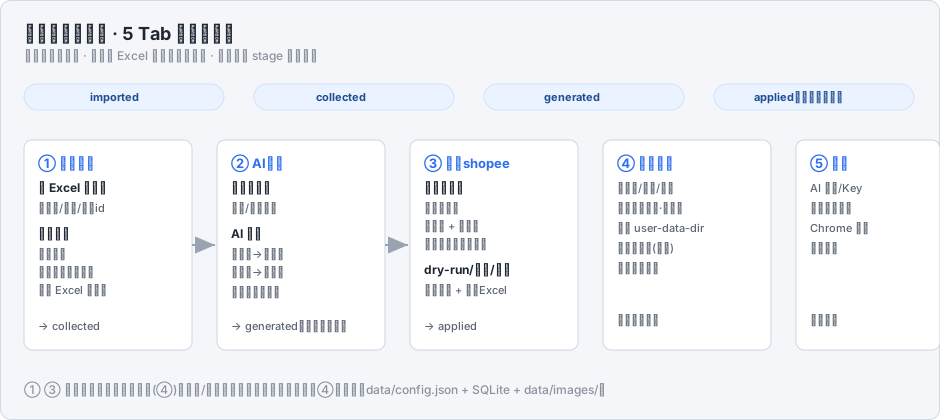


<svg xmlns="http://www.w3.org/2000/svg" width="940" height="420" viewBox="0 0 940 420" font-family="'Segoe UI','Microsoft YaHei',sans-serif">
|
|
<defs>
|
|
<marker id="arr" markerWidth="10" markerHeight="10" refX="7" refY="3" orient="auto"><path d="M0,0 L7,3 L0,6 Z" fill="#9aa3b2"/></marker>
|
|
<style>
|
|
.bg{fill:#f4f6f9;stroke:#d3d9e2}
|
|
.h1{fill:#1f2733;font-size:18px;font-weight:700}
|
|
.sub{fill:#8a92a0;font-size:12px}
|
|
.card{fill:#fff;stroke:#cdd6e2}
|
|
.tt{fill:#2f6fed;font-size:13px;font-weight:700}
|
|
.st{fill:#1f2733;font-size:12px;font-weight:600}
|
|
.ds{fill:#5c6573;font-size:11px}
|
|
.stage{fill:#eaf3ff;stroke:#cfe2fb}
|
|
.stageT{fill:#1f4e91;font-size:11px;font-weight:600}
|
|
.gate{fill:#fff7e6;stroke:#f0d089}
|
|
</style>
|
|
</defs>
|
|
<rect class="bg" x="0.5" y="0.5" width="939" height="419" rx="10"/>
|
|
<text class="h1" x="24" y="40">蝦皮圈優化助手 · 5 Tab 流水线总览</text>
|
|
<text class="sub" x="24" y="60">工作流优先顺序 · 对象是 Excel 里的每一行任务 · 状态字段 stage 贯穿全程</text>
|
|
|
|
<!-- stage chips row (无 confirmed、无常驻提交开关;③ 开始更新需批量确认) -->
|
|
<g transform="translate(24,84)">
|
|
<rect class="stage" x="0" y="0" width="200" height="26" rx="13"/><text class="stageT" x="66" y="17">imported</text>
|
|
<rect class="stage" x="230" y="0" width="200" height="26" rx="13"/><text class="stageT" x="292" y="17">collected</text>
|
|
<rect class="stage" x="460" y="0" width="200" height="26" rx="13"/><text class="stageT" x="520" y="17">generated</text>
|
|
<rect class="stage" x="690" y="0" width="200" height="26" rx="13"/><text class="stageT" x="730" y="17">applied(确认后提交)</text>
|
|
</g>
|
|
|
|
<!-- 5 tab cards -->
|
|
<g transform="translate(24,140)">
|
|
<!-- card template -->
|
|
<g>
|
|
<rect class="card" x="0" y="0" width="168" height="210" rx="8"/>
|
|
<text class="tt" x="14" y="28">① 导入采集</text>
|
|
<text class="st" x="14" y="52">读 Excel 输入列</text>
|
|
<text class="ds" x="14" y="72">账号名/别名/商品id</text>
|
|
<text class="st" x="14" y="98">只读采集</text>
|
|
<text class="ds" x="14" y="118">抓旧标题</text>
|
|
<text class="ds" x="14" y="136">下载旧封面到本地</text>
|
|
<text class="ds" x="14" y="154">回写 Excel 旧字段</text>
|
|
<text class="ds" x="14" y="190" fill="#20a464">→ collected</text>
|
|
</g>
|
|
<g transform="translate(193,0)">
|
|
<rect class="card" x="0" y="0" width="168" height="210" rx="8"/>
|
|
<text class="tt" x="14" y="28">② AI生成</text>
|
|
<text class="st" x="14" y="52">提示词输入</text>
|
|
<text class="ds" x="14" y="72">标题/封面分开</text>
|
|
<text class="st" x="14" y="98">AI 生成</text>
|
|
<text class="ds" x="14" y="118">旧标题→新标题</text>
|
|
<text class="ds" x="14" y="136">旧封面→新封面</text>
|
|
<text class="ds" x="14" y="156">双击看新旧封面</text>
|
|
<text class="ds" x="14" y="190" fill="#20a464">→ generated(无逐条审核)</text>
|
|
</g>
|
|
<g transform="translate(386,0)">
|
|
<rect class="card" x="0" y="0" width="168" height="210" rx="8"/>
|
|
<text class="tt" x="14" y="28">③ 更新shopee</text>
|
|
<text class="st" x="14" y="52">已生成任务</text>
|
|
<text class="ds" x="14" y="72">打开编辑页</text>
|
|
<text class="ds" x="14" y="90">换标题 + 换封面</text>
|
|
<text class="ds" x="14" y="108">开始更新确认后提交</text>
|
|
<text class="st" x="14" y="134">dry-run/串行/并行</text>
|
|
<text class="ds" x="14" y="154">实时写库 + 回写Excel</text>
|
|
<text class="ds" x="14" y="190" fill="#20a464">→ applied</text>
|
|
</g>
|
|
<g transform="translate(579,0)">
|
|
<rect class="card" x="0" y="0" width="168" height="210" rx="8"/>
|
|
<text class="tt" x="14" y="28">④ 账号管理</text>
|
|
<text class="ds" x="14" y="52">账号名/别名/端口</text>
|
|
<text class="ds" x="14" y="72">密码本地明文·仅参考</text>
|
|
<text class="ds" x="14" y="92">独立 user-data-dir</text>
|
|
<text class="ds" x="14" y="112">启动并登录(人工)</text>
|
|
<text class="ds" x="14" y="132">检测登录状态</text>
|
|
<text class="ds" x="14" y="184" fill="#8a92a0">配一次,少改</text>
|
|
</g>
|
|
<g transform="translate(772,0)">
|
|
<rect class="card" x="0" y="0" width="144" height="210" rx="8"/>
|
|
<text class="tt" x="14" y="28">⑤ 设置</text>
|
|
<text class="ds" x="14" y="52">AI 模型/Key</text>
|
|
<text class="ds" x="14" y="72">本地图片目录</text>
|
|
<text class="ds" x="14" y="92">Chrome 路径</text>
|
|
<text class="ds" x="14" y="112">端口范围</text>
|
|
<text class="ds" x="14" y="184" fill="#8a92a0">全局配置</text>
|
|
</g>
|
|
|
|
<!-- arrows between 1-2-3 -->
|
|
<line x1="168" y1="105" x2="191" y2="105" stroke="#9aa3b2" stroke-width="2" marker-end="url(#arr)"/>
|
|
<line x1="361" y1="105" x2="384" y2="105" stroke="#9aa3b2" stroke-width="2" marker-end="url(#arr)"/>
|
|
</g>
|
|
|
|
<text class="sub" x="24" y="394">① ③ 依赖账号已配置且已登录(④);未配/未登录则执行按钮禁用并提示去④。存储:data/config.json + SQLite + data/images/。</text>
|
|
</svg>
|