 chengma
3832697fc4
chengma
3832697fc4
- 扩展 SQLite schema:新增 batches、Excel 行定位、stage/status、时间戳和重试字段

- 明确 SQLite worker 并发规则:独立 connection、WAL、busy_timeout、短事务

- 调整 AI 接入顺序:先做模型清单后端,再接真实 ai.py,设置页复用后端

- 补充 unittest 测试基座要求和分层验证策略

- 敏感信息改为本地明文保存,配合 gitignore、UI 打码和日志脱敏
73 lines
5.4 KiB
XML
73 lines
5.4 KiB
XML
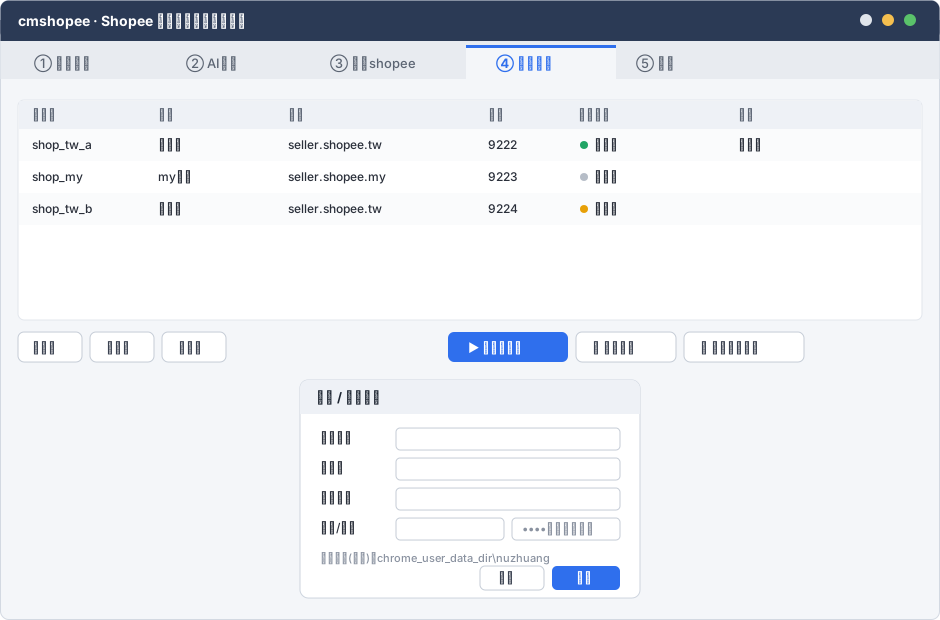


<svg xmlns="http://www.w3.org/2000/svg" width="940" height="620" viewBox="0 0 940 620" font-family="'Segoe UI','Microsoft YaHei',sans-serif">
|
||
<defs><style>
|
||
.win{fill:#f4f6f9;stroke:#d3d9e2}.hd{fill:#2b3a55}.title{fill:#fff;font-size:14px;font-weight:600}
|
||
.tab{fill:#e8ebf0}.tabA{fill:#f4f6f9}.tabT{fill:#5c6573;font-size:13px}.tabTA{fill:#2f6fed;font-size:13px;font-weight:600}
|
||
.sec{fill:#1f2733;font-size:13px;font-weight:600}.mut{fill:#8a92a0;font-size:11px}
|
||
.cell{fill:#2a2f3a;font-size:12px}.th{fill:#5c6573;font-size:12px;font-weight:600}
|
||
.btnP{fill:#2f6fed}.btnPT{fill:#fff;font-size:12px;font-weight:600}.btn{fill:#fff;stroke:#c5ccd6}.btnT{fill:#3a4150;font-size:12px}
|
||
.panel{fill:#fff;stroke:#e2e6ec}.inp{fill:#fff;stroke:#c5ccd6}.dlg{fill:#fff;stroke:#cdd4de}
|
||
</style></defs>
|
||
<rect class="win" x="0.5" y="0.5" width="939" height="619" rx="8"/>
|
||
<rect class="hd" x="0.5" y="0.5" width="939" height="40" rx="8"/><rect class="hd" x="0.5" y="20" width="939" height="21"/>
|
||
<text class="title" x="18" y="26">cmshopee · Shopee 商品批量改标题换封面</text>
|
||
<circle cx="888" cy="20" r="6" fill="#f5bf4f"/><circle cx="910" cy="20" r="6" fill="#5ac26a"/><circle cx="866" cy="20" r="6" fill="#e0e4ea"/>
|
||
|
||
<rect class="tab" x="0.5" y="41" width="939" height="38"/>
|
||
<rect class="tabA" x="466" y="45" width="150" height="38"/><rect x="466" y="45" width="150" height="3" fill="#2f6fed"/>
|
||
<text class="tabT" x="34" y="68">① 导入采集</text><text class="tabT" x="186" y="68">② AI生成</text>
|
||
<text class="tabT" x="330" y="68">③ 更新shopee</text>
|
||
<text class="tabTA" x="496" y="68">④ 账号管理</text>
|
||
<text class="tabT" x="636" y="68">⑤ 设置</text>
|
||
|
||
<!-- table -->
|
||
<g transform="translate(18,100)">
|
||
<rect class="panel" x="0" y="0" width="904" height="220" rx="6"/>
|
||
<rect x="1" y="1" width="902" height="28" fill="#eef1f6"/>
|
||
<text class="th" x="14" y="19">账号名</text><text class="th" x="140" y="19">别名</text>
|
||
<text class="th" x="270" y="19">地区</text><text class="th" x="470" y="19">端口</text>
|
||
<text class="th" x="560" y="19">登录状态</text><text class="th" x="720" y="19">备注</text>
|
||
<g font-size="12">
|
||
<rect x="1" y="29" width="902" height="32" fill="#fafbfc"/>
|
||
<text class="cell" x="14" y="49">shop_tw_a</text><text class="cell" x="140" y="49">女装店</text>
|
||
<text class="cell" x="270" y="49">seller.shopee.tw</text><text class="cell" x="470" y="49">9222</text>
|
||
<circle cx="566" cy="45" r="4" fill="#20a464"/><text class="cell" x="576" y="49">已登录</text><text class="cell" x="720" y="49">主力店</text>
|
||
|
||
<text class="cell" x="14" y="81">shop_my</text><text class="cell" x="140" y="81">my主店</text>
|
||
<text class="cell" x="270" y="81">seller.shopee.my</text><text class="cell" x="470" y="81">9223</text>
|
||
<circle cx="566" cy="77" r="4" fill="#b6bdc7"/><text class="cell" x="576" y="81">未登录</text>
|
||
|
||
<rect x="1" y="93" width="902" height="32" fill="#fafbfc"/>
|
||
<text class="cell" x="14" y="113">shop_tw_b</text><text class="cell" x="140" y="113">饰品店</text>
|
||
<text class="cell" x="270" y="113">seller.shopee.tw</text><text class="cell" x="470" y="113">9224</text>
|
||
<circle cx="566" cy="109" r="4" fill="#e7a008"/><text class="cell" x="576" y="113">未启动</text>
|
||
</g>
|
||
</g>
|
||
|
||
<!-- buttons -->
|
||
<g transform="translate(18,332)">
|
||
<rect class="btn" x="0" y="0" width="64" height="30" rx="6"/><text class="btnT" x="14" y="20">+新增</text>
|
||
<rect class="btn" x="72" y="0" width="64" height="30" rx="6"/><text class="btnT" x="88" y="20">✎编辑</text>
|
||
<rect class="btn" x="144" y="0" width="64" height="30" rx="6"/><text class="btnT" x="160" y="20">🗑删除</text>
|
||
<rect class="btnP" x="430" y="0" width="120" height="30" rx="6"/><text class="btnPT" x="450" y="20">▶ 启动并登录</text>
|
||
<rect class="btn" x="558" y="0" width="100" height="30" rx="6"/><text class="btnT" x="574" y="20">🔄 检测登录</text>
|
||
<rect class="btn" x="666" y="0" width="120" height="30" rx="6"/><text class="btnT" x="682" y="20">⧉ 生成快捷方式</text>
|
||
</g>
|
||
|
||
<!-- edit dialog overlay -->
|
||
<g transform="translate(300,380)">
|
||
<rect class="dlg" x="0" y="0" width="340" height="218" rx="8"/>
|
||
<rect x="0" y="0" width="340" height="34" rx="8" fill="#eef1f6"/><rect x="0" y="20" width="340" height="14" fill="#eef1f6"/>
|
||
<text class="sec" x="16" y="22">新增 / 编辑账号</text>
|
||
<g font-size="12" fill="#2a2f3a">
|
||
<text x="20" y="62">账号名*</text><rect class="inp" x="96" y="48" width="224" height="22" rx="4"/>
|
||
<text x="20" y="92">别名*</text><rect class="inp" x="96" y="78" width="224" height="22" rx="4"/>
|
||
<text x="20" y="122">地区域名</text><rect class="inp" x="96" y="108" width="224" height="22" rx="4"/>
|
||
<text x="20" y="152">端口/密码</text><rect class="inp" x="96" y="138" width="108" height="22" rx="4"/>
|
||
<rect class="inp" x="212" y="138" width="108" height="22" rx="4"/><text x="222" y="153" fill="#8a92a0">••••(本地明文)</text>
|
||
</g>
|
||
<text class="mut" x="20" y="182">配置目录(只读):chrome_user_data_dir\nuzhuang</text>
|
||
<rect class="btn" x="180" y="186" width="64" height="24" rx="5"/><text class="btnT" x="198" y="202">取消</text>
|
||
<rect class="btnP" x="252" y="186" width="68" height="24" rx="5"/><text class="btnPT" x="276" y="202">保存</text>
|
||
</g>
|
||
</svg>
|