 chengma
3832697fc4
chengma
3832697fc4
- 扩展 SQLite schema:新增 batches、Excel 行定位、stage/status、时间戳和重试字段

- 明确 SQLite worker 并发规则:独立 connection、WAL、busy_timeout、短事务

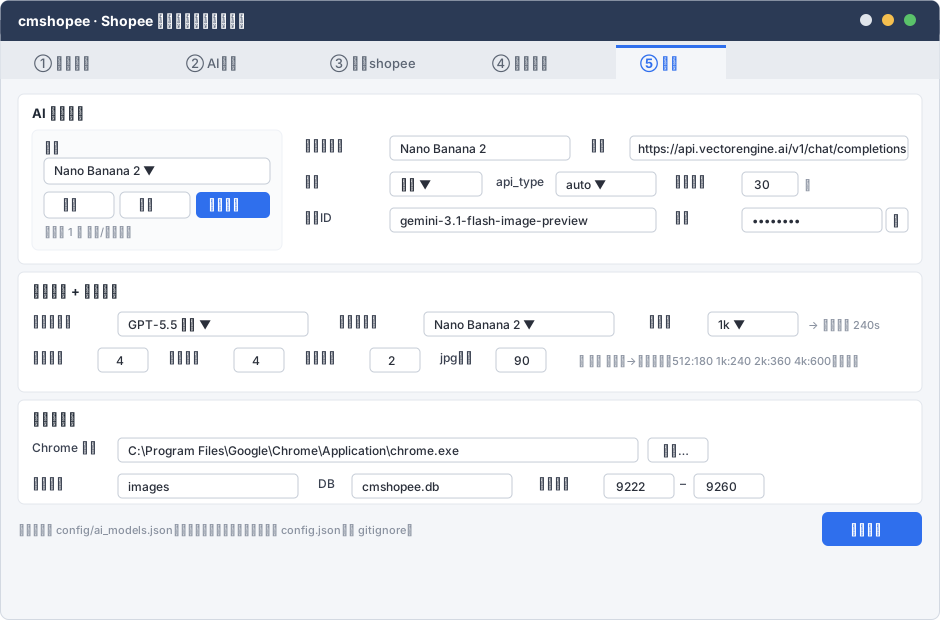
- 调整 AI 接入顺序:先做模型清单后端,再接真实 ai.py,设置页复用后端

- 补充 unittest 测试基座要求和分层验证策略

- 敏感信息改为本地明文保存,配合 gitignore、UI 打码和日志脱敏
82 lines
7.2 KiB
XML
82 lines
7.2 KiB
XML


<svg xmlns="http://www.w3.org/2000/svg" width="940" height="620" viewBox="0 0 940 620" font-family="'Segoe UI','Microsoft YaHei',sans-serif">
|
||
<defs><style>
|
||
.win{fill:#f4f6f9;stroke:#d3d9e2}.hd{fill:#2b3a55}.title{fill:#fff;font-size:14px;font-weight:600}
|
||
.tab{fill:#e8ebf0}.tabA{fill:#f4f6f9}.tabT{fill:#5c6573;font-size:13px}.tabTA{fill:#2f6fed;font-size:13px;font-weight:600}
|
||
.sec{fill:#1f2733;font-size:13px;font-weight:600}.mut{fill:#8a92a0;font-size:11px}
|
||
.cell{fill:#2a2f3a;font-size:12px}.lbl{fill:#3a4150;font-size:12px}
|
||
.btnP{fill:#2f6fed}.btnPT{fill:#fff;font-size:12px;font-weight:600}.btn{fill:#fff;stroke:#c5ccd6}.btnT{fill:#3a4150;font-size:12px}
|
||
.panel{fill:#fff;stroke:#e2e6ec}.inp{fill:#fff;stroke:#c5ccd6}.sub{fill:#fafbfc;stroke:#eef1f6}
|
||
</style></defs>
|
||
<rect class="win" x="0.5" y="0.5" width="939" height="619" rx="8"/>
|
||
<rect class="hd" x="0.5" y="0.5" width="939" height="40" rx="8"/><rect class="hd" x="0.5" y="20" width="939" height="21"/>
|
||
<text class="title" x="18" y="26">cmshopee · Shopee 商品批量改标题换封面</text>
|
||
<circle cx="888" cy="20" r="6" fill="#f5bf4f"/><circle cx="910" cy="20" r="6" fill="#5ac26a"/><circle cx="866" cy="20" r="6" fill="#e0e4ea"/>
|
||
|
||
<rect class="tab" x="0.5" y="41" width="939" height="38"/>
|
||
<rect class="tabA" x="616" y="45" width="110" height="38"/><rect x="616" y="45" width="110" height="3" fill="#2f6fed"/>
|
||
<text class="tabT" x="34" y="68">① 导入采集</text><text class="tabT" x="186" y="68">② AI生成</text>
|
||
<text class="tabT" x="330" y="68">③ 更新shopee</text><text class="tabT" x="492" y="68">④ 账号管理</text>
|
||
<text class="tabTA" x="640" y="68">⑤ 设置</text>
|
||
|
||
<!-- A. AI 模型管理 (master-detail) -->
|
||
<g transform="translate(18,94)">
|
||
<rect class="panel" x="0" y="0" width="904" height="170" rx="6"/>
|
||
<text class="sec" x="14" y="24">AI 模型管理</text>
|
||
|
||
<!-- left: model selector -->
|
||
<rect class="sub" x="14" y="36" width="250" height="120" rx="6"/>
|
||
<text class="lbl" x="26" y="58">模型</text>
|
||
<rect class="inp" x="26" y="64" width="226" height="26" rx="5"/><text class="cell" x="36" y="81">Nano Banana 2 ▼</text>
|
||
<rect class="btn" x="26" y="98" width="70" height="26" rx="5"/><text class="btnT" x="44" y="115">新增</text>
|
||
<rect class="btn" x="102" y="98" width="70" height="26" rx="5"/><text class="btnT" x="120" y="115">删除</text>
|
||
<rect class="btnP" x="178" y="98" width="74" height="26" rx="5"/><text class="btnPT" x="190" y="115">测试连接</text>
|
||
<text class="mut" x="26" y="142">至少各 1 个 文本/图像模型</text>
|
||
|
||
<!-- right: detail form -->
|
||
<text class="lbl" x="286" y="56">服务商名称</text><rect class="inp" x="372" y="42" width="180" height="24" rx="4"/><text class="cell" x="382" y="59">Nano Banana 2</text>
|
||
<text class="lbl" x="572" y="56">网址</text><rect class="inp" x="612" y="42" width="278" height="24" rx="4"/><text class="cell" x="620" y="59" font-size="11" fill="#586073">https://api.vectorengine.ai/v1/chat/completions</text>
|
||
|
||
<text class="lbl" x="286" y="92">类别</text><rect class="inp" x="372" y="78" width="92" height="24" rx="4"/><text class="cell" x="382" y="95">图像 ▼</text>
|
||
<text class="lbl" x="478" y="92">api_type</text><rect class="inp" x="538" y="78" width="100" height="24" rx="4"/><text class="cell" x="548" y="95">auto ▼</text>
|
||
<text class="lbl" x="656" y="92">连接超时</text><rect class="inp" x="724" y="78" width="56" height="24" rx="4"/><text class="cell" x="736" y="95">30</text><text class="mut" x="786" y="95">秒</text>
|
||
|
||
<text class="lbl" x="286" y="128">模型ID</text><rect class="inp" x="372" y="114" width="266" height="24" rx="4"/><text class="cell" x="382" y="131" font-size="11" fill="#586073">gemini-3.1-flash-image-preview</text>
|
||
<text class="lbl" x="656" y="128">密钥</text><rect class="inp" x="724" y="114" width="140" height="24" rx="4"/><text class="cell" x="734" y="131" fill="#8a92a0">••••••••</text>
|
||
<rect class="btn" x="868" y="114" width="22" height="24" rx="4"/><text class="btnT" x="874" y="131">👁</text>
|
||
</g>
|
||
|
||
<!-- B. 角色 + 生成参数 -->
|
||
<g transform="translate(18,272)">
|
||
<rect class="panel" x="0" y="0" width="904" height="120" rx="6"/>
|
||
<text class="sec" x="14" y="24">角色分配 + 生成参数</text>
|
||
<text class="lbl" x="14" y="54">标题大模型</text><rect class="inp" x="100" y="40" width="190" height="24" rx="4"/><text class="cell" x="110" y="57">GPT-5.5 文本 ▼</text>
|
||
<text class="lbl" x="320" y="54">图片大模型</text><rect class="inp" x="406" y="40" width="190" height="24" rx="4"/><text class="cell" x="416" y="57">Nano Banana 2 ▼</text>
|
||
<text class="lbl" x="630" y="54">分辨率</text><rect class="inp" x="690" y="40" width="90" height="24" rx="4"/><text class="cell" x="700" y="57">1k ▼</text>
|
||
<text class="mut" x="790" y="57">→ 返回超时 240s</text>
|
||
|
||
<text class="lbl" x="14" y="90">标题并发</text><rect class="inp" x="80" y="76" width="50" height="24" rx="4"/><text class="cell" x="98" y="93">4</text>
|
||
<text class="lbl" x="150" y="90">图片并发</text><rect class="inp" x="216" y="76" width="50" height="24" rx="4"/><text class="cell" x="234" y="93">4</text>
|
||
<text class="lbl" x="286" y="90">失败重试</text><rect class="inp" x="352" y="76" width="50" height="24" rx="4"/><text class="cell" x="370" y="93">2</text>
|
||
<text class="lbl" x="422" y="90">jpg质量</text><rect class="inp" x="478" y="76" width="50" height="24" rx="4"/><text class="cell" x="496" y="93">90</text>
|
||
<text class="mut" x="560" y="93">▸ 高级 分辨率→返回超时:512:180 1k:240 2k:360 4k:600(可改)</text>
|
||
</g>
|
||
|
||
<!-- C. 路径与运行 -->
|
||
<g transform="translate(18,400)">
|
||
<rect class="panel" x="0" y="0" width="904" height="104" rx="6"/>
|
||
<text class="sec" x="14" y="24">路径与运行</text>
|
||
<text class="lbl" x="14" y="52">Chrome 路径</text><rect class="inp" x="100" y="38" width="520" height="24" rx="4"/>
|
||
<text class="cell" x="110" y="55" font-size="11" fill="#586073">C:\Program Files\Google\Chrome\Application\chrome.exe</text>
|
||
<rect class="btn" x="630" y="38" width="60" height="24" rx="4"/><text class="btnT" x="644" y="55">浏览…</text>
|
||
<text class="lbl" x="14" y="88">图片目录</text><rect class="inp" x="100" y="74" width="180" height="24" rx="4"/><text class="cell" x="110" y="91" fill="#586073">images</text>
|
||
<text class="lbl" x="300" y="88">DB</text><rect class="inp" x="334" y="74" width="160" height="24" rx="4"/><text class="cell" x="344" y="91" fill="#586073">cmshopee.db</text>
|
||
<text class="lbl" x="520" y="88">端口范围</text><rect class="inp" x="586" y="74" width="70" height="24" rx="4"/><text class="cell" x="598" y="91">9222</text>
|
||
<text class="lbl" x="662" y="88">–</text><rect class="inp" x="676" y="74" width="70" height="24" rx="4"/><text class="cell" x="688" y="91">9260</text>
|
||
</g>
|
||
|
||
<g transform="translate(0,512)">
|
||
<rect class="btnP" x="822" y="0" width="100" height="34" rx="6"/><text class="btnPT" x="850" y="22">保存设置</text>
|
||
<text class="mut" x="18" y="22">模型清单存 config/ai_models.json(密钥本地明文);选择与参数存 config.json。均 gitignore。</text>
|
||
</g>
|
||
</svg>
|