
22 lines
3.8 KiB
XML
22 lines
3.8 KiB
XML
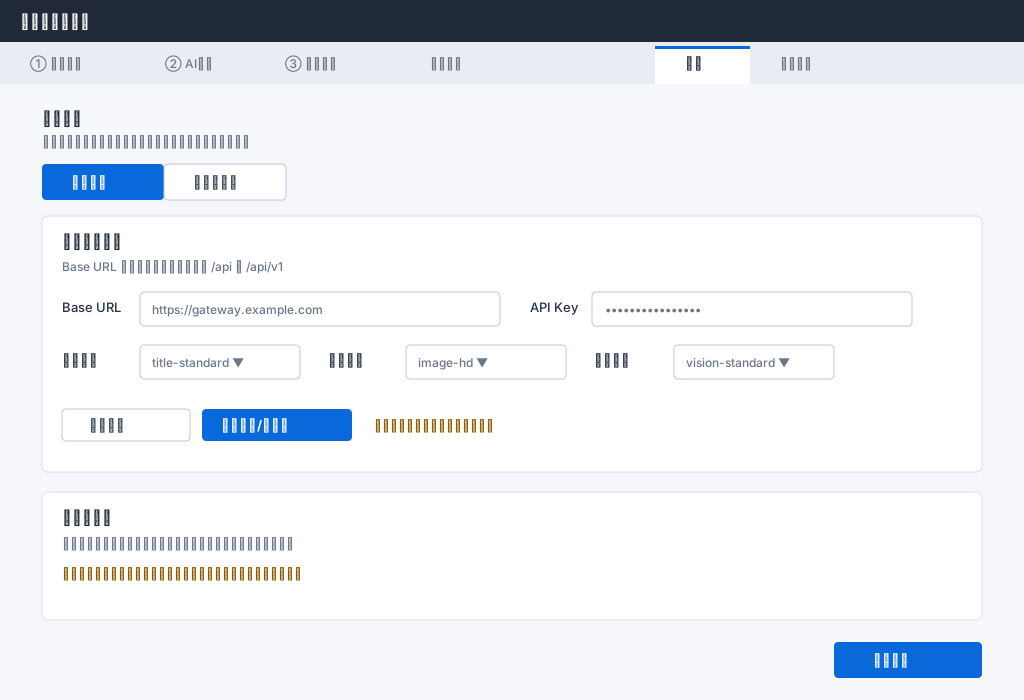


<svg xmlns="http://www.w3.org/2000/svg" width="1024" height="700" viewBox="0 0 1024 700" font-family="'Segoe UI','Microsoft YaHei',sans-serif">
|
|
<defs><style>.bg{fill:#f5f7fa}.bar{fill:#1f2937}.tabs{fill:#e9edf3}.active{fill:#fff}.card{fill:#fff;stroke:#d9e0ea}.field{fill:#fff;stroke:#bdc7d5}.text{fill:#253041;font-size:13px}.muted{fill:#6b7788;font-size:12px}.title{fill:#fff;font-size:15px;font-weight:600}.section{fill:#1f2937;font-size:15px;font-weight:600}.selected{fill:#0969da}.primary{fill:#0969da}.selectedText,.primaryText{fill:#fff;font-size:13px;font-weight:600}.buttonText{fill:#344255;font-size:13px}.hint{fill:#8b5d00;font-size:12px}</style></defs>
|
|
<rect class="bg" width="1024" height="700"/>
|
|
<rect class="bar" width="1024" height="42"/><text class="title" x="20" y="27">蝦皮圈優化助手</text>
|
|
<rect class="tabs" y="42" width="1024" height="42"/><rect class="active" x="655" y="46" width="95" height="38"/><rect class="selected" x="655" y="46" width="95" height="3"/>
|
|
<text class="muted" x="30" y="68">① 导入采集</text><text class="muted" x="165" y="68">② AI生成</text><text class="muted" x="285" y="68">③ 更新蝦皮</text><text class="muted" x="430" y="68">账号管理</text><text class="text" x="685" y="68">设置</text><text class="muted" x="780" y="68">商品套图</text>
|
|
<text class="section" x="42" y="124">生成网关</text><text class="muted" x="42" y="146">选择后先预览配置,点击保存设置后才切换本次使用的来源</text>
|
|
<rect class="selected" x="42" y="164" width="122" height="36" rx="4"/><text class="selectedText" x="71" y="187">默认网关</text><rect class="field" x="164" y="164" width="122" height="36" rx="4"/><text class="buttonText" x="193" y="187">自定义网关</text>
|
|
<rect class="card" x="42" y="216" width="940" height="256" rx="6"/>
|
|
<text class="section" x="62" y="247">默认网关配置</text><text class="muted" x="62" y="271">Base URL 只填默认网关根,不要带 /api 或 /api/v1</text>
|
|
<text class="text" x="62" y="312">Base URL</text><rect class="field" x="140" y="292" width="360" height="34" rx="4"/><text class="muted" x="152" y="314">https://gateway.example.com</text>
|
|
<text class="text" x="530" y="312">API Key</text><rect class="field" x="592" y="292" width="320" height="34" rx="4"/><text class="muted" x="605" y="314">••••••••••••••••</text>
|
|
<text class="text" x="62" y="365">生文别名</text><rect class="field" x="140" y="345" width="160" height="34" rx="4"/><text class="muted" x="152" y="367">title-standard ▼</text>
|
|
<text class="text" x="328" y="365">生图别名</text><rect class="field" x="406" y="345" width="160" height="34" rx="4"/><text class="muted" x="418" y="367">image-hd ▼</text>
|
|
<text class="text" x="594" y="365">图片理解</text><rect class="field" x="674" y="345" width="160" height="34" rx="4"/><text class="muted" x="686" y="367">vision-standard ▼</text>
|
|
<rect class="field" x="62" y="409" width="128" height="32" rx="4"/><text class="buttonText" x="89" y="430">刷新别名</text><rect class="primary" x="202" y="409" width="150" height="32" rx="4"/><text class="primaryText" x="221" y="430">测试连接/查余额</text><text class="hint" x="374" y="430">账号「主账号」连接默认网关成功</text>
|
|
<rect class="card" x="42" y="492" width="940" height="128" rx="6"/>
|
|
<text class="section" x="62" y="523">自定义网关</text><text class="muted" x="62" y="548">切换后显示模型列表、模型详情、默认文本模型和默认图像模型。</text>
|
|
<text class="hint" x="62" y="578">图片理解与商品套图仅支持默认网关;自定义网关不显示点数余额。</text>
|
|
<rect class="primary" x="834" y="642" width="148" height="36" rx="4"/><text class="primaryText" x="873" y="665">保存设置</text>
|
|
</svg>
|